Tillys - Random Thought #1
 2026-06-12 |
  Yves Reynhout |
  8 minutes ]
One of many things that rubbed me the wrong way with Tillys, a small point of sale system I wrote and used last year, was that changes to the menu mid-service initially broke changing existing ticket orders and later led to complicated front-end logic in an attempt - a poor one - to fix it. Granted, this was a rare occurrence, usually an "oh-no moment" right before service where you realize you made a boo-boo, but it hinted at a deeper underlying modeling issue.
My endeavor is too small to classify this as something worth spending time on, but part of building my own POS is similar to how somebody goes to the gym ... it's a workout for my brain.
This year I've tackled things differently, so follow along with some of my thinking and modeling on the subject. A menu contains menu options, a menu option potentially has variants. The sections (is it food or a drink) and categories (for food in my case: a pizza, pasta, salad, pastry; for drinks in my case: water, soft, hot, cocktail, beer, wine) are strongly typed because I don't have to cater to the millions of menus in the world, just mine. So you naturally get a pizza having a name, toppings, a shape (round, slice, small, ...), a price with an amount and both a table service and take away tax rate (included in the amount), whereas a wine has a name, a brand, the years I've got in stock, the style (sparkling or still) and color (red, white, rose), a region (including country), an alcohol % and variants such as by the glass or bottle, both with a respective volume (15cl vs 75cl) and obviously a price (same as before: amount, tax rates). A perk of this strong typing is that it helped come up with the dialogs for the menu editor.
type Subject =
    { Id: string
      FullName: string
      EmailAddress: string }

type TaxRate =
    | TwentyOnePercent
    | TwelvePercent
    | SixPercent
    | ZeroPercent

type PriceOption =
    { Amount: decimal
      TableTaxRate: TaxRate
      TakeAwayTaxRate: TaxRate }

type PizzaShape =
    | Tonda = 0
    | AlTaglio = 1
    | Pizzetta = 2

type PizzaOption =
    { Name: string
      Toppings: string list
      Shape: PizzaShape
      Price: PriceOption }

type SandwichOption =
    { Name: string
      Toppings: string list
      Price: PriceOption }

type SaladOption =
    { Name: string
      Ingredients: string list
      Price: PriceOption }

type PastryOption =
    { Name: string
      Ingredients: string list
      Price: PriceOption }

type PastaOption =
    { Name: string
      Ingredients: string list
      Price: PriceOption }

type FoodOptions =
    | PizzaOption of PizzaOption
    | SandwichOption of SandwichOption
    | SaladOption of SaladOption
    | PastaOption of PastaOption
    | PastryOption of PastryOption

type VolumeMeasure =
    | Centiliter = 0
    | Liter = 1

type Volume =
    { Amount: decimal; Unit: VolumeMeasure }

type Variant = { Volume: Volume; Price: PriceOption }

type WaterOption =
    { Name: string
      Brand: string option
      Variants: Variant list }

type SoftDrinkOption =
    { Name: string
      Brand: string option
      Variants: Variant list }

type BeerOption =
    { Name: string
      Brand: string option
      Variants: Variant list
      AlcoholPercentage: decimal }

type CocktailOption =
    { Name: string
      Portion: Volume
      Price: PriceOption
      Ingredients: string list
      AlcoholPercentage: decimal }

type WineColor =
    | Red
    | White
    | Rose

type WineStyle =
    | Still of WineColor
    | Sparkling of WineColor

type WineVariant =
    | Glass of Variant
    | Bottle of Variant

type WineOption =
    { Name: string
      Brand: string option
      Years: int list
      Style: WineStyle
      Variants: WineVariant list
      Region: string
      AlcoholPercentage: decimal }

type HotDrinkOption =
    { Name: string
      Brand: string option
      Variants: Variant list }

type DrinkOptions =
    | WaterOption of WaterOption
    | SoftDrinkOption of SoftDrinkOption
    | BeerOption of BeerOption
    | CocktailOption of CocktailOption
    | WineOption of WineOption
    | HotDrinkOption of HotDrinkOption

type MenuOption =
    | FoodOption of FoodOptions
    | DrinkOption of DrinkOptions

type Menu = { Options: MenuOption list }

type MenuVersion =
    { Options: MenuOption list
      Version: int }

type PlanTableMenu = { Menu: Menu; By: Subject }

type PublishTableMenu = { Menu: Menu; By: Subject }

type TableMenuPlanned =
    { Menu: MenuVersion
      By: Subject
      At: Instant }

type TableMenuPublished =
    { Menu: MenuVersion
      By: Subject
      At: Instant }
The order in which these options appear in the menu, on a technical level, is not important. That does become important once you get to displaying them in print, where you group options in the same section, then in each category within a section, listing categories in a certain order, and options either by price or alphabetically or some other heuristic, variants shown inline rather than as separate lines. It's also important that display order is stable during order taking because you naturally develop muscle memory of where buttons are. I've relied on bespoke sorting functions to keep it relatively stable.
Ideally food would be linked to recipes and ingredients used in those recipes, which in turn would inform one about the possible food allergies they might trigger. I've been tinkering with cooklang, automatic invoice reading (finally a good Peppol use case), keeping track of food preparations, doing stock management for this purpose, but nowhere near something that I'd deem production worthy ...that, I'm afraid, will be for another year, eventually we'll get there, or not, who really cares 😃 For now, given the limited amount of ingredients I use, it's easy enough to remember all the allergens mentioned on the packaging.
Now, menus are either planned or published, that's it. Each planned or published version is essentially an immutable list of menu options. That's the key insight ... it makes deriving a key composed of the menu version, the index of the option in that version, and the optional index of a variant within that option dead easy. Turn that into a string and you get a key like "v7:d5.0" saying "we've looked at menu v7, picked the sixth drink in there and the first variant". The joy of being off-by-one and microformats.
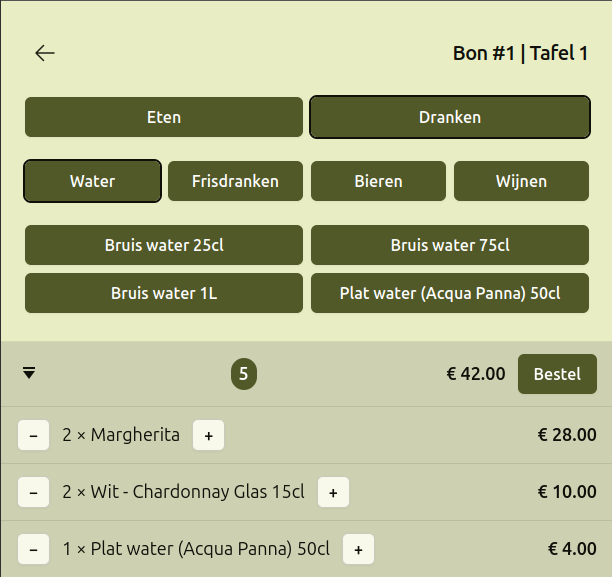
Only published menus are used during order taking. I don't have any menu scheduling needs, that is, planning what I'd be serving during a given service and have it magically come into effect right before that service. No, I just publish whatever I'm gonna be using now or in the near future. That means the order taking part, the counter, simply loads the latest menu, chops it up into sections and categories as something you progressively navigate through to get to the option or option - variant combo of your choice. Clicking menu options implies adding them to a table ticket. At this point a menu option becomes a menu item, part of a table ticket line item. Given that each menu option has a (derivable) key, figuring out whether we're increasing the quantity on an existing ticket line item vs adding a genuinely new ticket line item vs adding an item which happens to come from a different menu version becomes as easy as matching on the key. If the menu version the option came from happens to be different, I do not mind seeing 2 lines with the same menu item name - if anything, it makes the situation I ran into explicit. But ... there's always a butt, just ask Beavis.
type MenuOptionKey =
    { OptionIndex: int
      VariantIndex: int option }

type MenuItemId =
    { MenuVersion: int; Key: MenuOptionKey }

type ServiceType =
    | TableService = 0
    | TakeAway = 1

type TicketLineItemId =
    { MenuItemId: MenuItemId
      ServiceType: ServiceType }

type Price = { Amount: decimal; TaxRate: TaxRate }

type TicketMenuItem = // mirrors MenuOption
    | FoodItem of FoodItem // ommitted for brevity
    | DrinkItem of DrinkItem // ommitted for brevity

type TicketLineItem =
    { ItemId: TicketLineItemId
      Item: TicketMenuItem
      Quantity: int
      Price: Price
      TotalAmount: decimal }

type TableTicketOrderTaken =
    { Date: LocalDate      // essentially an integer
      Ticket: TicketNumber // essentially an integer
      Table: TableNumber   // essentially an integer
      Items: TicketLineItem list
      TicketLabel: string option
      TotalAmount: decimal
      TotalAmountDue: decimal
      Revision: int
      At: Instant          // essentially an integer
      By: Subject }
On a technical level this sounds reasonable and plausible, but there is an elephant in the room. How happy would you - as a customer - be if the same (menu) item came at a different price or with different toppings compared to the print copy you just ordered it from? Why? Because I just happened to update the menu in between taking and changing your order ... pretty damn illegal, if you ask me. Nothing like taking that fluffy beautiful model you've just dreamed up and punch it into mush. The in-between solution I've come up with is "you're stuck with the menu version you started this ticket out with, that is, the version used when taking the order for the first time". It balances the ability to fix boo-boos before or even during service (with an obligatory "you better print those f* menus again" and, yes, I do use paper menus, no QR code scanning here, old-skool), with delivering on what-you-see-is-what-you-get-and-pay-for. Now, I've got very crude tools I could use to "move" a ticket to a new version of the menu but they imply closing and cancelling the ticket and entering it all again as a new ticket - that's on purpose - this sort of undesirable behavior should not be made easy.
So what good comes out of all this? Making the implicit explicit, progressive insight in what seemed like a technical problem at first, giving me a frame of reference and some basic constructs to reason about all this without it being embedded in front-end spaghetti. This sort of thing is not constrained to my silly example here ... any place where you "use inventory" you will run into this problem yet the solutions will be very different: e-commerce and product catalogs, libraries and the material they lend, a rental service and the things they rent, etc.